> For the complete documentation index, see [llms.txt](https://docs.peakcommerce.com/llms.txt). Markdown versions of documentation pages are available by appending `.md` to page URLs; this page is available as [Markdown](https://docs.peakcommerce.com/product/using-peakcommerce/orders-and-transactions.md).
# Orders & Transactions
Every purchase a customer makes — through a journey, the customer portal, or the API — becomes a **commercial order** that PeakCommerce records and dispatches to your billing system. **Orders** and **Transactions** (under **Commerce**) are where you see what was sold, where it was routed, and whether billing succeeded.
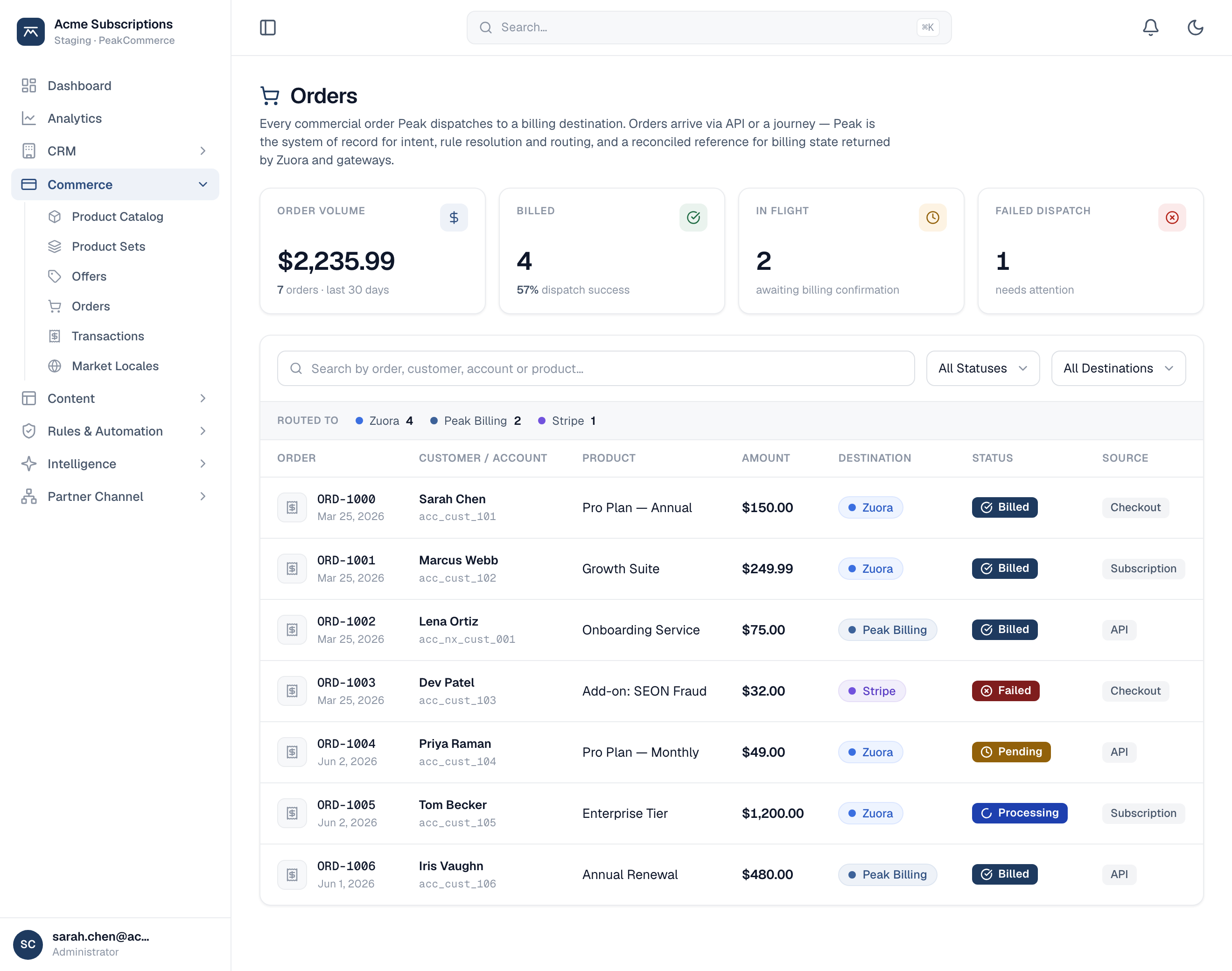
Orders (Commerce → Orders) — each order's billing destination, status, and source, with dispatch health summarized up top.
## Orders
An order captures the **intent** of a purchase — the customer, the products and amounts, and the journey or channel it came from. PeakCommerce is the system of record for that intent, its rule resolution, and its routing to a billing destination.
Each order shows:
* **Customer / account** — who the order is for.
* **Product and amount** — what was sold and for how much.
* **Destination** — the billing system the order is dispatched to (for example Zuora, Stripe, or Peak Billing).
* **Status** — where the order is in its lifecycle: *Billed*, *Processing*, *Pending*, or *Failed* (needs attention).
* **Source** — how it originated: a checkout, a subscription change, or the API.
Summary tiles track order volume, how many billed successfully, how many are still in flight, and how many **failed dispatch** and need attention. Failed orders stay visible so you can diagnose and re-dispatch them — billing failures are never hidden.
## Transactions
Where Orders track what was sold, **Transactions** track the money: invoices, payments, refunds, and credit memos reconciled back from your billing system and payment gateways. Use them to confirm that an order actually billed and was paid, and to investigate a disputed or failed charge.
## Who and when
Admins and CSRs use **Orders** to confirm a sale dispatched correctly and to triage anything that failed; **Transactions** give finance and support a reconciled view of invoices and payments tied back to each order.
## Related
* [Products Overview](/product/using-peakcommerce/products-and-bundles/products-overview.md)
* [Payments & Payment Methods](/product/using-peakcommerce/payments-and-payment-methods.md)
---
# Agent Instructions
This documentation is published with GitBook. GitBook is the documentation platform designed so that both humans and AI agents can read, navigate, and reason over technical content effectively. Learn more at gitbook.com.
## Querying This Documentation
If you need additional information that is not directly available in this page, you can query the documentation dynamically by asking a question.
Perform an HTTP GET request on the current page URL with the `ask` query parameter, and the optional `goal` query parameter:
```
GET https://docs.peakcommerce.com/product/using-peakcommerce/orders-and-transactions.md?ask=&goal=
```
`ask` is the immediate question: it should be specific, self-contained, and written in natural language.
`goal` is optional and describes the broader end goal you are ultimately trying to accomplish on behalf of the user. GitBook uses it to tailor the answer towards what is most useful for that goal.
The response will contain a direct answer to the question and relevant excerpts and sources from the documentation.
Use this mechanism when the answer is not explicitly present in the current page, you need clarification or additional context, or you want to retrieve related documentation sections.