> For the complete documentation index, see [llms.txt](https://docs.peakcommerce.com/llms.txt). Markdown versions of documentation pages are available by appending `.md` to page URLs; this page is available as [Markdown](https://docs.peakcommerce.com/product/settings/organization/domains.md).
# Domains
**Settings → Domains** manages the hostnames your portals and pages are served from, so your customers and staff see your brand in the URL instead of a generic PeakCommerce address. Add a branded hostname, map it to the right experience, and PeakCommerce walks it through DNS verification and SSL provisioning until it's live.
## Custom Domains
Use **Add Custom Domain** to register a branded hostname. Each entry shows its **hostname**, **experience**, **status**, and **assigned page**:
* **Experience** — what the hostname routes to: **Journey**, **Storefront**, **Customer portal**, **Partner portal**, **Payment**, or **Admin & CSR Portal**. Login and signup hosts can be paired to a portal so they fall back correctly. *Admin & CSR Portal* (staff-plane) hosts are provisioned by PeakCommerce operations and aren't verified from this screen.
* **Status** — the provisioning lifecycle: **Pending DNS** → **DNS Verified** → **Provisioning SSL** → **Active** (with **Failed** / **Suspended** states if something goes wrong). Use the per-row **Verify** action after you've added the DNS records, and the DNS-records dialog to see exactly which records to create at your registrar.
### Brands on domains
If your tenant has [brands](/product/settings/organization/brands.md), a custom domain can serve one of them, shown in the **Brand** column. You can filter the list by brand.
* **Add Custom Domain** asks which brand the hostname serves. Choose **No brand — your company site** for your tenant's own site, which isn't tied to any brand. Every tenant can have a company site, and each brand can add its own domains alongside it.
* A **login** or **signup** domain serves the same brand as the portal it's paired with. If you leave the brand empty, it takes the portal's brand; a different brand is refused.
* To move a domain to another brand, choose **Change Brand** from the row's **⋯** menu. Changing a portal's brand also moves the login and signup domains paired with it.
* *Admin & CSR Portal* hosts show **All brands**: your staff work across every brand.
The brand on a domain decides what customers see there. A customer who signs in on one brand's portal sees only that brand's subscriptions, even if they also buy from another of your brands.
Your company site — a domain with no brand — shows all of your records, including ones with no brand. Subscriptions with no brand, for example ones sold before you added brands, appear **only** there, never on a brand's portal. To show them on a brand's portal instead, assign them to that brand (see [Assign records that came from somewhere else](/product/settings/organization/brands.md#assign-records-that-came-from-somewhere-else)).
## Subdomain Mappings
Shared-platform subdomain mappings let you route subdomains to experiences without standing up a fully custom certificate — useful for quick branded entry points on the shared platform.
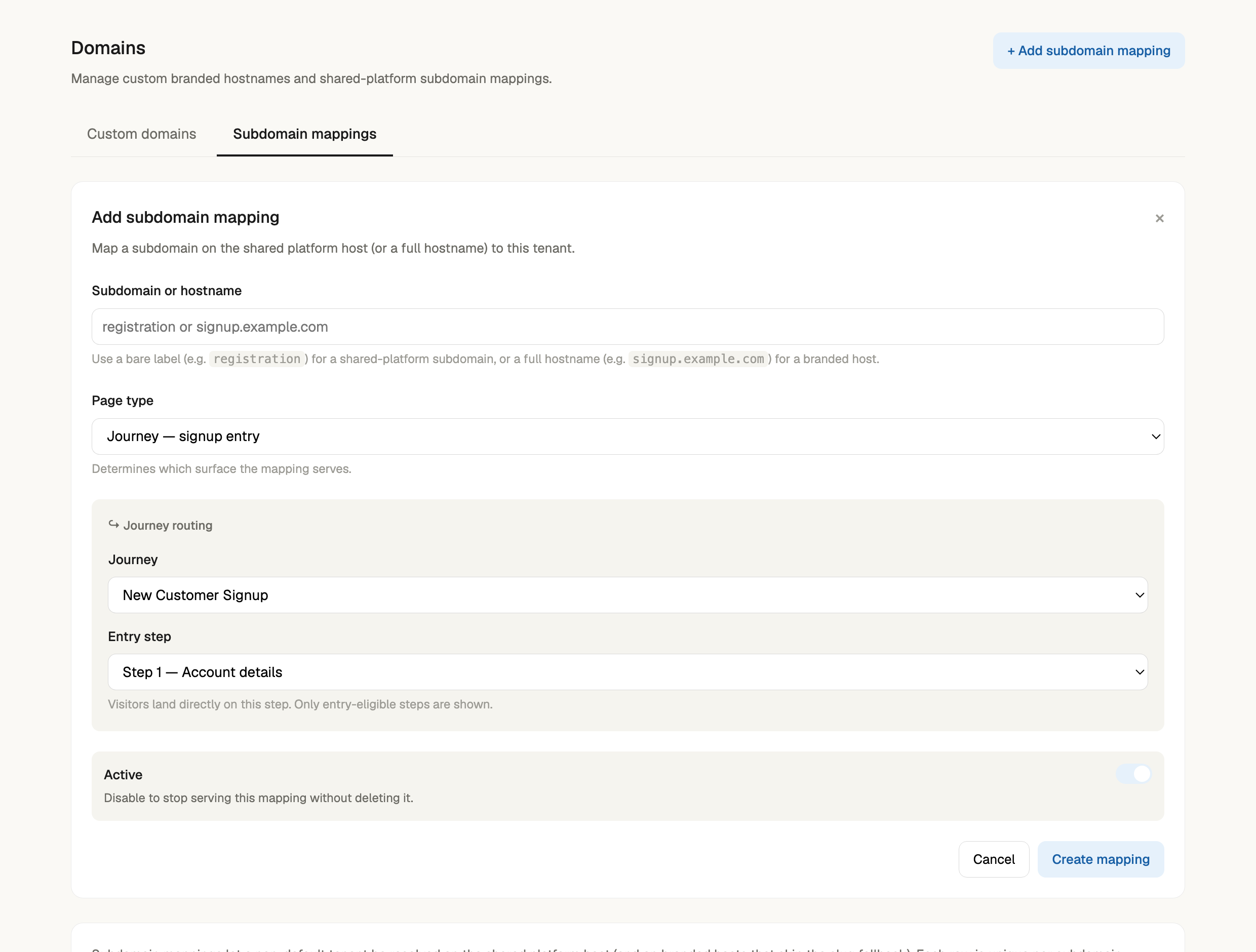
A mapping picks a **page type** (Customer portal, Partner portal, Journey, or a specific Page) and, for a journey, the exact **entry step** the host lands on — so you can point a branded host straight at a particular point in a flow (for example a signup domain that drops visitors on the account-details step).
Mapping a subdomain to a journey — pick the journey and the entry step the branded host lands visitors on.
## Gotchas
* DNS changes propagate on their own schedule; a host can sit in **Pending DNS** until the records resolve. Re-run **Verify** rather than re-adding the host.
* A host shows **Active** only after SSL provisioning completes — don't share the URL before then.
Next: [General Settings](/product/settings/organization/company-settings.md) for tenant naming and favicon, or the [Settings overview](/product/settings/settings-overview.md).
---
# Agent Instructions
This documentation is published with GitBook. GitBook is the documentation platform designed so that both humans and AI agents can read, navigate, and reason over technical content effectively. Learn more at gitbook.com.
## Querying This Documentation
If you need additional information that is not directly available in this page, you can query the documentation dynamically by asking a question.
Perform an HTTP GET request on the current page URL with the `ask` query parameter, and the optional `goal` query parameter:
```
GET https://docs.peakcommerce.com/product/settings/organization/domains.md?ask=&goal=
```
`ask` is the immediate question: it should be specific, self-contained, and written in natural language.
`goal` is optional and describes the broader end goal you are ultimately trying to accomplish on behalf of the user. GitBook uses it to tailor the answer towards what is most useful for that goal.
The response will contain a direct answer to the question and relevant excerpts and sources from the documentation.
Use this mechanism when the answer is not explicitly present in the current page, you need clarification or additional context, or you want to retrieve related documentation sections.