> For the complete documentation index, see [llms.txt](https://docs.peakcommerce.com/llms.txt). Markdown versions of documentation pages are available by appending `.md` to page URLs; this page is available as [Markdown](https://docs.peakcommerce.com/product/rules-and-customizations/rules-overview/creating-and-managing-rule-sets.md).
# Creating and Managing Rule Sets
Business rules control how subscription changes behave and enforce policy automatically as customers — and CSRs — move through a journey. Manage them under **Rules & Automation → Business Rules**.
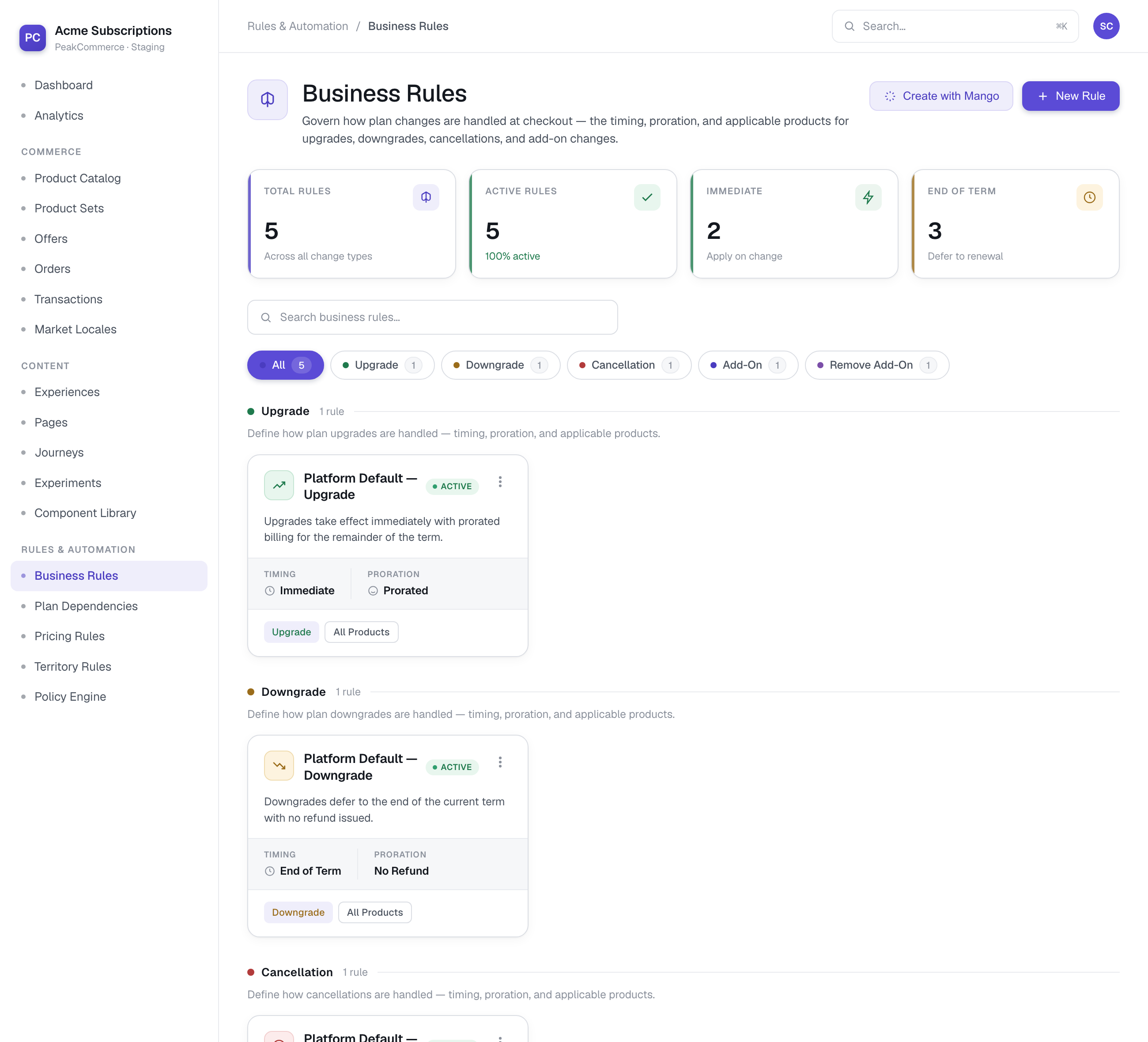
Business Rules (Rules & Automation → Business Rules) — rules grouped by change type, each showing its timing and proration.
A primary use is **change-plan timing**: deciding *when* an upgrade or downgrade takes effect, how it's prorated, how add-ons are handled, and which products, plans, and customer audiences the rule applies to.
Watch a retention guardrail being built — a cancellation rule with end-of-term timing, reserved for the support team:
{% embed url="" %}
And its counterpart — an upgrade rule that takes effect immediately and prorates the charge:
{% embed url="" %}
## The rule form
Each rule defines:
* **Name** — a unique label.
* **Direction** — which kind of change the rule governs: an upgrade, downgrade, cancellation, add-on, add-on removal, or retention discount. This is what the rule matches on; there is no separate event field.
* **Change timing** — when the change takes effect:
* **Immediate** — applies right away.
* **End of term** — applies at the end of the current billing term.
* **Specific** — applies after a set offset, configured with a **Timing value** and **Timing unit** (for example 30 days).
* **Proration** — whether and how the change is prorated.
* **Dependency behavior** and **Co-term to base** — how add-ons and dependent charges are handled relative to the base subscription (for example co-terming an add-on so it ends with the base term).
## Scope a rule
The **Scope** section narrows which subscriptions a rule applies to:
* **Applicable products** — apply to all products, or only specific ones.
* **Applicable plans** — within a product, apply to **All plans** or **Specific plans**. "Plan" is provider-agnostic — a Zuora rate plan, a Stripe price, or a Maxio price point — so you can target individual plans.
* **Applicable audiences** — leave empty to apply to all customers, or scope to one or more **audiences** so timing and behavior can differ per cohort (for example a EUR cohort versus a USD cohort).
## When several rules match
Rules do not carry a priority number, and you do not order them by hand. When more than one rule matches a change, **the most specific one wins**, using this precedence:
1. Audience **and** plan
2. Audience **and** product or category
3. Plan
4. Product
5. Category
6. Audience-wide
7. Tenant-wide default
A rule scoped to a particular surface (customer or CSR) edges out an equally specific rule that applies to any surface. If two rules are still tied after all of that, the most recently updated one is used — so re-saving a rule is enough to break a tie in its favour.
The practical implication: to make a rule apply to a narrow case, **scope it more tightly** rather than trying to promote it above the others.
## CSR overrides and policy locks
In a change-plan journey, a CSR can override the timing on a specific change — **unless** the matching rule is **policy-locked**. A policy-locked rule enforces its timing: the CSR can't override it, and an attempt to do so is blocked so the change follows the fixed business policy.
## Related
* **Pricing Rules** — pricing-specific logic such as discounts and price overrides.
* **Plan Dependencies** — which plans and add-ons can be combined.
---
# Agent Instructions
This documentation is published with GitBook. GitBook is the documentation platform designed so that both humans and AI agents can read, navigate, and reason over technical content effectively. Learn more at gitbook.com.
## Querying This Documentation
If you need additional information that is not directly available in this page, you can query the documentation by asking a question.
Perform an HTTP GET request on the following URL with the `ask` and `goal` query parameters:
```
GET https://docs.peakcommerce.com/product/rules-and-customizations/rules-overview/creating-and-managing-rule-sets.md?ask=&goal=
```
`ask` is the immediate question: it should be specific, self-contained, and written in natural language.
`goal` is what the user is ultimately trying to achieve, the reason they need the answer. Sharing it helps GitBook give you a better, more relevant answer. A goal is most helpful when it describes the outcome the user wants rather than restating the question. For example, with `ask=how do I create an API token`, a goal like `automate deployments from our CI pipeline` lets GitBook tailor the answer to that use case.
The response will contain a direct answer to the question and relevant excerpts and sources from the documentation.
Use this mechanism when the answer is not explicitly present in the current page, you need clarification or additional context, or you want to retrieve related documentation sections.