> For the complete documentation index, see [llms.txt](https://docs.peakcommerce.com/llms.txt). Markdown versions of documentation pages are available by appending `.md` to page URLs; this page is available as [Markdown](https://docs.peakcommerce.com/integrations/analytics-and-data/heap-analytics/type-of-information-available-in-heap.md).
# Type of Information Available in Heap
### Overview
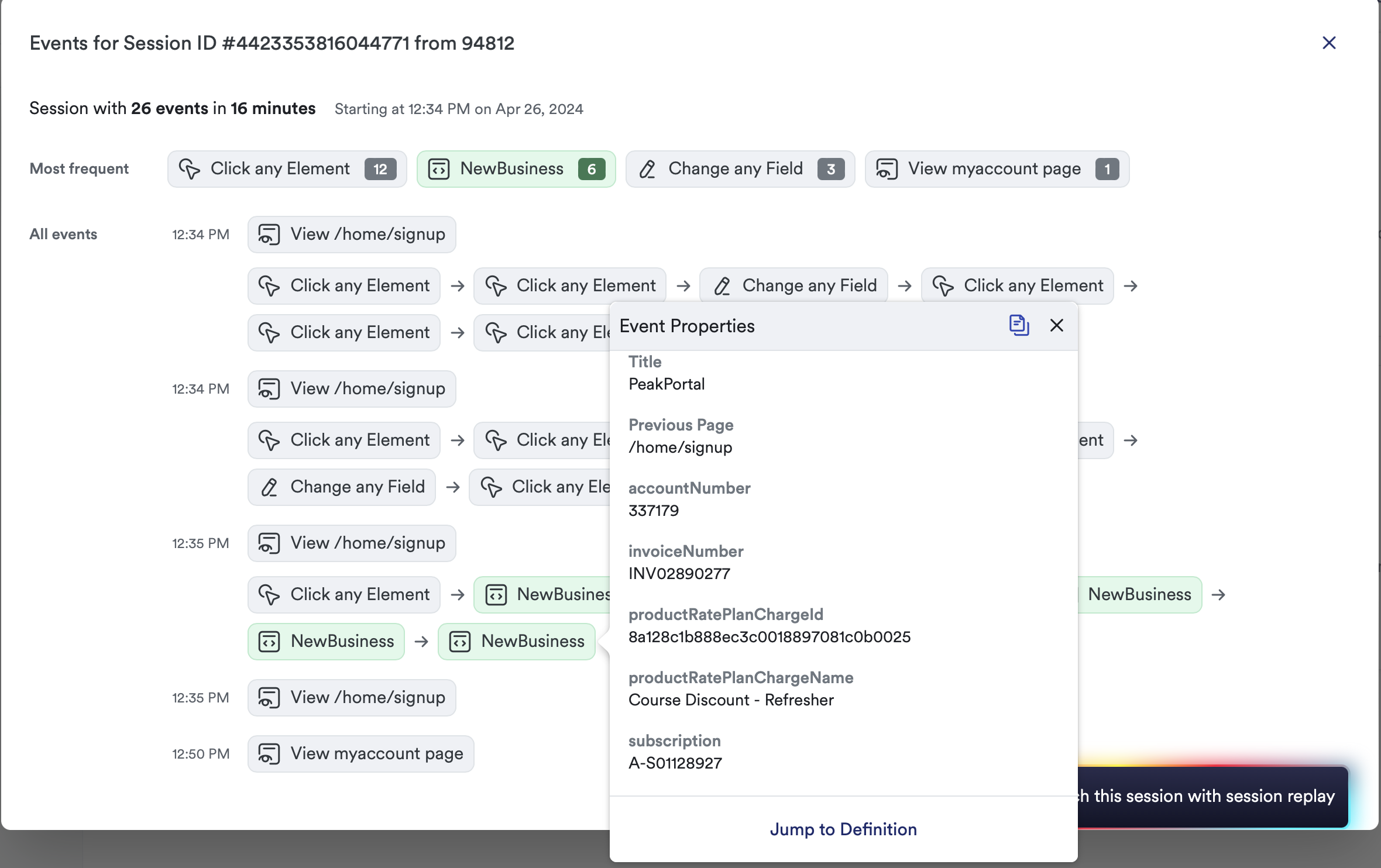
Heap Analytics is a powerful tool that automatically tracks a wide range of user interactions within PeakCommerce without the need for manual event tracking. Here are some of the key types of information that Heap Analytics can track:
1. **Pageviews**: Heap can capture every pageview in PeakCommerce, allowing you to see which pages users are visiting and how they navigate through your site.
2. **Clicks**: It tracks every click made by users, including clicks on buttons, links, images, and other elements. This helps you understand how users interact with the PeakCommerce interface.
3. **Form Submissions**: Heap automatically records form submissions, such as contact forms, sign-up forms, and checkout forms. This allows you to track user conversions and identify any drop-off points in your forms.
4. **User Sessions**: Heap tracks individual user sessions, providing insights into how users engage with PeakCommerce and your custom landing pages over time. You can see when users first visit your site, how long they stay, and what actions they take during their session.
5. **Events**: You can define custom events to track specific actions that are important to your business, such as product views, purchases, or video plays. Heap captures these events and allows you to analyze them alongside other user interactions.
6. **User Attributes**: In addition to tracking user interactions, Heap also collects user attributes such as demographics, device information, and referral sources. This helps you understand your audience and tailor your marketing efforts accordingly.
7. **Click Heatmaps**: Heap provides click heatmaps that visually display where users are clicking in PeakCommerce. This can help you identify popular areas as well as areas that may need improvement.
8. **Retention Analysis**: Heap offers retention analysis tools that allow you to track user retention over time. You can see how many users return after their initial visit and analyze their behavior over multiple sessions.
### Example Fields Available
| Type | NewBusiness |
| ------------------------- | --------------------------------------------------------------------------------------------------------------------------- |
| Domain | [https://](https://store.yourdomain.com/)[store.yourdomain.com](https://store.yourdomain.com/) |
| Path | /home/signup |
| Browser Type | Other Browser |
| Continent | No Continent Data |
| Internal User | External |
| Marketing Channel | Direct |
| Search Engine | Other Search Engine |
| Social Network | None |
| Event ID | 1288606226769260 |
| Pageview ID | 7967123559701635 |
| Session ID | 4423353816044771 |
| Source | Web |
| Time | April 26, 2024 at 12:35:08 pm |
| Referrer | [https://](https://d36000000jzs5eag.my.salesforce.com/)[mydomain.my.salesforce.com/](http://mydomain.my.salesforce.com/) |
| Landing Page | [https://](https://store.vectorvest.com/home/signup)[store.mydomain.com/home/signup](http://store.mydomain.com/home/signup) |
| Browser | Chrome 124.0.6367 |
| Device Type | Desktop |
| Platform | Windows 10 |
| IP Address | 172.82.26.238 |
| Country | United States |
| Region | Ohio |
| City | Akron |
| Query | ?origin=salesforce\&accId=2c92a0fr657038a20162z58cc28775a6\&source= |
| Hash | #step11 |
| Title | My Page Title |
| Previous Page | /home/signup |
| accountNumber | 337179 |
| invoiceNumber | INV02890277 |
| productRatePlanChargeId | 8a128c1b888ec3c0018897081c0b0025 |
| productRatePlanChargeName | Hubspot Premium Plan |
| subscription | A-S01128927 |
---
# Agent Instructions
This documentation is published with GitBook. GitBook is the documentation platform designed so that both humans and AI agents can read, navigate, and reason over technical content effectively. Learn more at gitbook.com.
## Querying This Documentation
If you need additional information that is not directly available in this page, you can query the documentation dynamically by asking a question.
Perform an HTTP GET request on the current page URL with the `ask` query parameter, and the optional `goal` query parameter:
```
GET https://docs.peakcommerce.com/integrations/analytics-and-data/heap-analytics/type-of-information-available-in-heap.md?ask=&goal=
```
`ask` is the immediate question: it should be specific, self-contained, and written in natural language.
`goal` is optional and describes the broader end goal you are ultimately trying to accomplish on behalf of the user. GitBook uses it to tailor the answer towards what is most useful for that goal.
The response will contain a direct answer to the question and relevant excerpts and sources from the documentation.
Use this mechanism when the answer is not explicitly present in the current page, you need clarification or additional context, or you want to retrieve related documentation sections.